
FitScroll
One push-up buys one minute of Instagram. Run out and it locks.
Watch it run
02 TAKESEvery feature, step by step
01 FEATURES · 03 SCREENS · OPEN ONEEarn it, then spend it
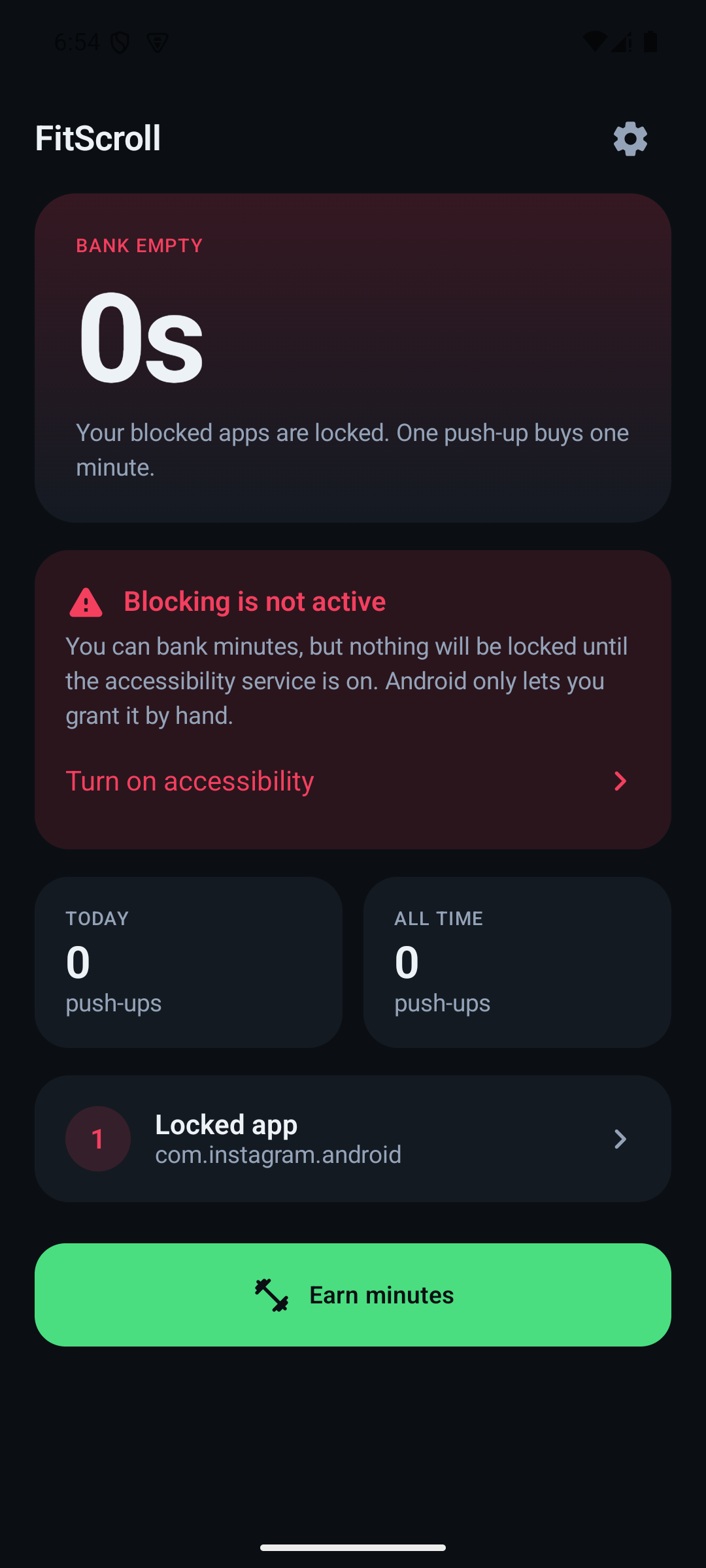
03 STEPSThe whole loop, in the order you meet it: what an empty bank means, what the app will accept as a rep, and which apps it holds hostage until you do one.
Captured on an Android 15 emulator by driving the real 0.4.0 release APK through Appium, so this is the shipped app rather than a web build or a mock-up. The bank reads empty because it is a fresh install and the only thing that fills it is push-ups in front of the camera, which an emulator cannot supply. The app list is the emulator’s own. The walkthrough is the same session screen-recorded off the device and centred in a 16:9 frame, since the app is portrait.
I did not want another app telling me how long I had been on Instagram. I wanted one that made me pay for it. FitScroll counts your push-ups through the phone’s camera, banks each clean rep as one minute of screen time, and enforces that budget on whichever apps you pick — and every minute expires 24 hours after you earn it, so you cannot grind once on Sunday and coast all week. Everything that counts a rep or spends a minute runs on-device: no account, no sync, no analytics, and no camera frame ever leaves the phone.
How it’s put together
Built with
- PERIOD
- August 2026
- ROLE
- Solo — design, build, ship
- SOURCE
- View on GitHub ↗
The hard parts
13 NOTESThe rules are pure functions taking an explicit `now` — the bank, the rep counter, the blocking decision, the drain reconciler, the per-second meter. That is what makes 125 tests possible with no device and no 24-hour wait: expiry boundaries, oldest-first spending, cap overflow and every anti-cheat gate are pinned down as arithmetic. The parts that genuinely need Android get Robolectric — the stored ledger, its reload, the day rollover, and the corrupt-ledger path that has to fail into an empty bank rather than a crash loop, because a crash loop leaves the accessibility service holding the block with no way to reach the camera.
The gate that makes a rep a push-up is not an angle. Stand up, hold the phone in front of you and curl your arms, and every angle check passes — elbow locked out at the top, bent at the bottom, a dead-straight body line throughout. Only the fact that your body never moved gives it away. So a rep also requires your shoulders to drop by a fraction of your own shoulder-to-hip length, measured as a ratio so it holds at any distance from the lens, and set low enough that anyone actually on the floor clears it without thinking about it.
Strictness tightens five things at once, and deliberately not a sixth. It used to raise the required landmark confidence as well — which meant level 5 was quietly asking for a better view of you rather than a better push-up. Looking down at the floor is enough to drop the pose model’s confidence across every landmark, so reps stopped counting entirely at level 5 while the identical rep counted at level 1. There is one visibility floor for all five levels now; strictness governs form only.
The body-line thresholds look lenient on paper and are not. This is a 2D estimate from a single camera: unless the lens sits exactly perpendicular to you, perspective foreshortens your torso and a genuinely straight back measures well under 180°. Thresholds that are correct in geometry reject real push-ups at real phone placements.
A rep is not judged frame by frame, because the pose model jitters by a few degrees on a motionless subject and a single noisy sample was throwing away clean reps. Each level instead carries a sag allowance — how long within one rep you may be outside tolerance before it is voided. Real sag lasts; noise does not. And if your legs are out of frame the model *guesses* your knee position, so the app declines to judge your back at all rather than failing you on a guess, and says “back not checked” on screen so a refusal reads as feedback rather than as a broken app.
The lock lands on top of the blocked app, mid-scroll, rather than only at the moment you open it. It is drawn as an accessibility overlay, which the service is granted directly — so “Display over other apps” stays genuinely optional, and where it is missing the one button that needs it says so instead of appearing to do nothing.
Knowing which app is in front takes two kinds of event, not one. A window-state change says a window just took the screen, which is the only signal that an app switch happened at all — but it describes transitions only. Pull the notification shade down over Instagram and the app underneath never goes away, so nothing announces its return when the shade closes. A scroll event says a package is on screen right now, which closes that gap. The service is declared `canRetrieveWindowContent="false"` and reads nothing off either event but the package name and the window class.
The meter charges measured time rather than counting ticks, because a timer that is throttled, coalesced or briefly starved silently under-bills — and the failure looks exactly like the app working. Below an hour the balance counts in seconds for the same reason: a number that only moves once a minute looks identical whether the drain is running or stuck, which made every real bug in it hard to tell from an imagined one.
Android reports app switches, not a live answer to “what is on screen”, so sometimes the meter has to guess — a service killed mid-scroll, or a phone unlocked back into whatever it was showing. It resumes on the remembered package, because the alternative is free scrolling every time the process is recycled, but a guessed *drain* expires after 30 seconds unless something confirms it, so the most a wrong one can cost you is half a minute. A guessed *lock* is not put on the same clock, because the failures are not comparable: a drain that guessed wrong spends a bank silently, while a lock that guessed wrong is a screen in front of you with a button on it.
Copies handed out by hand have no update channel, so every sideloaded build checks one published file and withdraws itself if told to. It is a version floor rather than a switch — one number retires everything older at once, and a notice can never retire a build that did not exist when it was written. It fails open on purpose: no answer, for any reason, leaves the last one standing, and the first answer is “supported”, because bricking someone’s app because their plane has no wifi would be a worse bug than a build living too long. When a build does retire it stops blocking first, and the banked minutes stay on disk for whatever installs over the top. The Play build compiles the URL to an empty string and never touches the network.
Android identifies an app by package name *and* signing certificate, so the key you hand builds out with is a commitment: a build signed with a different key cannot update one already installed — it has to be uninstalled first, which deletes the user’s banked minutes. Release builds fall back to the debug key when there is no keystore, so a fresh clone still produces something installable, and the README says plainly that anything given to another person must be built with the real one.
ML Kit ships native inference for four ABIs and two of them only ever run on emulators, which made the universal APK 82MB — more than half of it code no phone can execute. Filtering at the source rather than only in the split brings the safe-for-anything build to 44MB and the arm64 one to 29MB. The APKs are also named after the app and its version rather than after the build system, because handed over in a chat the filename is the only label they have.
It is a commitment device, not a jail, and the README says so first rather than last: on Android you can disable the accessibility service or uninstall the app in under a minute. It works by adding friction at the moment of the impulse. Expiry rides the wall clock and you own the wall clock — winding it back cannot mint minutes, since a credit stamped in the future is pulled back to now, so the worst it buys is one ordinary day — but nothing here pretends to be tamper-proof.
The workout screen. Everything above is reachable by driving the UI; the rep counter is not. It is fed by CameraX and ML Kit pose detection on live frames with no debug or simulated-rep path anywhere in the view model — by design, since a counter that can be told a rep happened is not a counter. So the one screen that shows the app doing its actual job needs a real phone, a real camera and a real set, recorded off the device. That footage is being shot; until it lands this sheet shows the screens that could be photographed honestly rather than a mock-up of the one that could not.
Want the parts that aren’t on this page — the architecture arguments, the things that broke, a live walkthrough?