
Medical Practice Management Platform
The system a Jakarta family practice runs on every day.
Watch it run
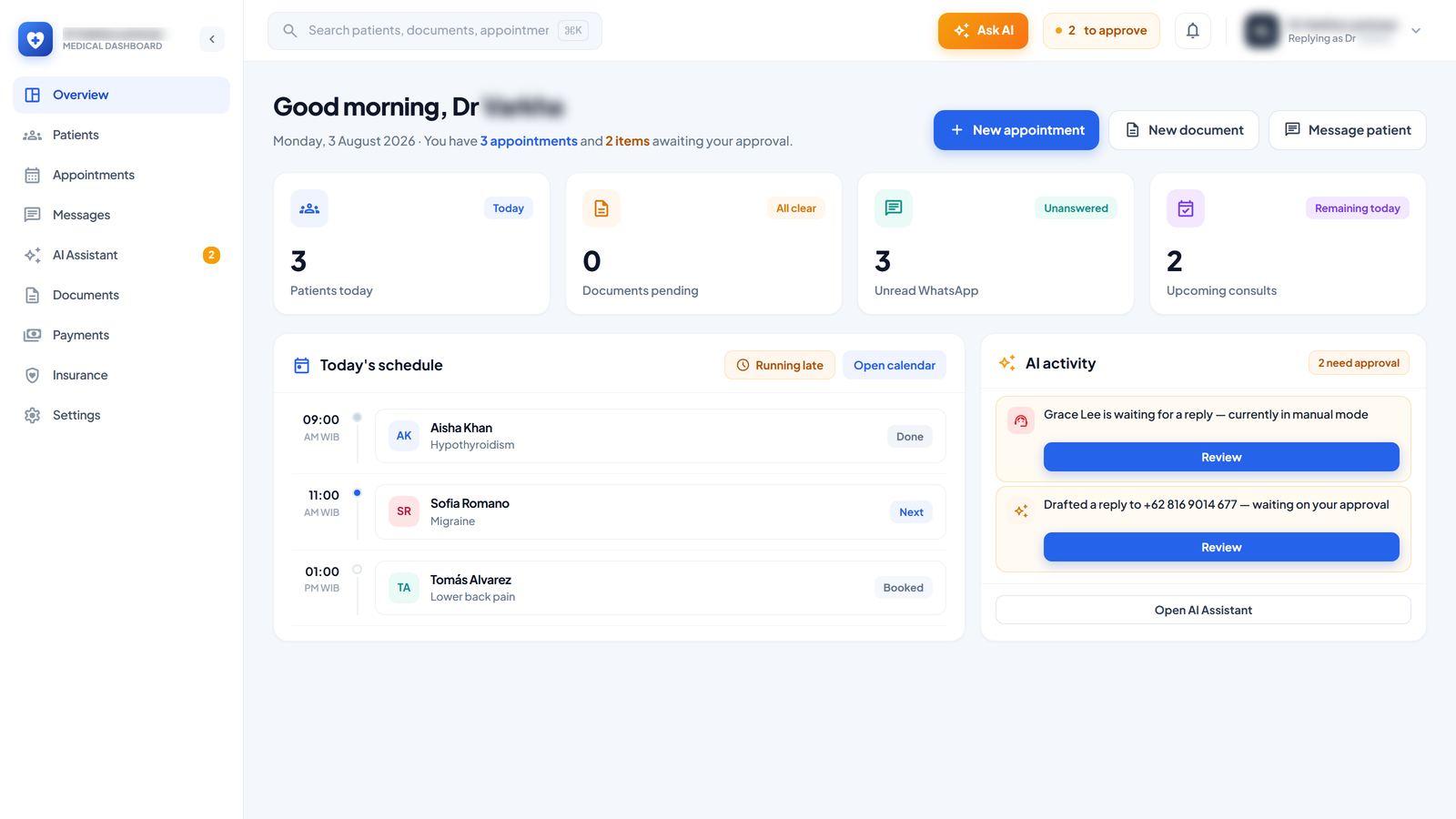
02 TAKESEvery feature, step by step
07 FEATURES · 28 SCREENS · OPEN ONEA day at the practice
04 STEPSWhat the doctor sees when she sits down, and how she gets from the day, to the week, to a new booking.
Seeing a patient
05 STEPSFrom the patient list to a written-up consultation — the path this software exists to shorten.
Issuing a document, start to finish
04 STEPSFive document types, one shared template package, and a preview that is literally the file that gets sent.
WhatsApp, and how much the assistant may do
03 STEPSPatients message the practice on WhatsApp. Every contact has its own leash, and the assistant hands over anything it should not be answering.
Getting paid, and getting reimbursed
04 STEPSTwo different problems: chasing what patients owe, and filling in what insurers demand before they pay.
The parts nobody demos
02 STEPSWhat the assistant is allowed to tell patients, when the practice is open, and where each kind of notification lands.
The same app, on the phone she actually uses
06 STEPSShe sees patients at a partner hospital and online, and reaches for the phone between them. Below 760px every table becomes a list of cards, the consultation form takes the whole screen, and nothing smaller than 13px or narrower than a 44px thumb target survives.
All captured from the real app running in its demo mode, which starts with no database credentials at all: it skips the login and physically cannot reach the practice’s data. Every patient, message, invoice, claim and document here is invented — the eight demo patients the app ships with, plus stand-in rows written for the screens that normally read from the live backend, so they could be photographed without touching anything real. The insurance form is likewise a mock-up, drawn for the demo from an insurer that does not exist. The doctor’s own details are blurred wherever they appear: her name, the hospital she practises at, her registration and licence numbers, phone, bank accounts, email and signature seal. Beyond that nothing has been retouched — every layout, control and state is the software as it ran. All of it was re-shot from the current build, driven by Playwright rather than photographed by hand, with the browser pinned to a Monday morning in Jakarta so the schedule is busy and the clock agrees with the bookings. Two things in these screens are stand-ins rather than demo-mode defaults: WhatsApp, payments, insurance and the two Technical cards read from the live backend and render empty without it, so invented rows were supplied for the capture and removed again afterwards. The figures on the AI usage card are therefore plausible rather than measured; every other number on this page is countable in the repository. The phone screens are the same React build at 412×916, the size the mobile pass was measured against.
I spent three years as a medical assistant digitising patient records by hand. This is the software that replaced that job. It started as something I built for myself to use, and the practice now licenses it on a paid monthly subscription — patients, appointments, billing, insurance claims, clinical documents and messaging in one place, on the web and on Android.
How it’s put together
Built with
- PERIOD
- June 2026 — Present
- ROLE
- Solo — design, build, ship, support
- SOURCE
- Private repository — it holds real clinical data. Walkthrough available on request.
The hard parts
36 NOTESA TypeScript monorepo on npm workspaces: a React dashboard, a second Android app, a shared package holding the document templates, and a standalone ingestion tool — around 56,000 lines across 378 files, with 75 serverless Deno edge functions and 42 PostgreSQL migrations behind them, covered by 725 unit tests.
The browser only ever holds the read-only anon key. Every write goes through an edge function, so the privileged path is a list of 73 named operations rather than a database the client can reach — a stolen key from a laptop in a consulting room reads nothing it should not and writes nothing at all.
That was the design, and for a while it was not what was actually running. A migration had converted every “allow read for all” policy to an authenticated-only one, but on the live database row-level security was switched off — and a policy on a table with RLS off is inert. Measured with nothing but the public anon key, no login and no session, eleven tables still answered: patients, medical records, history events, billing, files, generated documents, WhatsApp messages and four more. One of those rows was a real patient’s name, and that key ships inside the client bundle. The fix re-asserts the same expression the working tables already use, every step idempotent so it converges from any starting point, and turns RLS back on first — which was the step doing the real work.
The Google connection could have been completed by a stranger. `google-oauth-callback` is public by necessity — Google redirects a browser to it and that carries no session — and what it did with that request was exchange any code it was handed and write the resulting refresh token in as the practice’s own, unconditionally. The client id and redirect URI both ship in the client bundle because OAuth requires them to, so anyone could build the consent URL, approve it with their own Google account, and let Google redirect them here; from that moment the nightly backup — every table, every patient, one gzipped file — and every generated report and signed claim would upload to a stranger’s Drive, with nobody at the practice doing anything or seeing anything. The missing piece was `state`, and it cannot live in the browser: the callback is a top-level redirect rather than a fetch from the app, so it cannot read sessionStorage. It is minted server-side behind a real dashboard session, stored, and consumed exactly once, constant-time, within fifteen minutes. Building the URL server-side had a second effect worth having: the client id and redirect URI no longer ship in the client bundle at all.
Two-step sign-in sits in Settings beside the screen lock, optional and off until she turns it on, for the same reason — a second step nobody chose is one that gets worked around. The password stays shared between her and the nurse, which is a decision about how the practice runs; what changes is that a shared password is no longer the only thing in front of every patient record. The gate asks for the code on every pass rather than only after the password screen, because a session restored from storage arrives at aal1 and would otherwise walk straight past it. The SQL that requires aal2 to read is deliberately not a migration: `db push` runs migrations, and a file that can lock the practice out of its own records should never run because somebody deployed.
Patient names stopped crossing the boundary to Anthropic. There is no BAA and no zero-retention arrangement — both were looked at and ruled out as impractical to obtain from Indonesia — so the lever left is to send less. Every patient carries a number now, and the number is what goes out: names are scrubbed on the way to the API and restored on the way back, including in the arguments the model hands a tool, without which it passes P-0042 as the name to search for or print on a document. Values are walked rather than serialised, because a name containing a quote appears escaped in JSON, so a scrub misses it and a rehydrate leaves a string that no longer parses — both failures silent, both on real names. `patient_number` is NOT NULL with its allocation as the column default, which matters more than it looks: the scrubber is a no-op given an empty number, so a nullable column would turn “we forgot to set it on this path” into “this patient’s real name went to the API”, silently, with every test still green. Chat titles used to come off Claude Fable 5, a Covered Model carrying 30-day retention, which made one sidebar label the practice’s entire retained footprint at Anthropic — and its own prompt asked for a patient name. Titles come from her own words, locally, now.
That first pass was name-only, and a name is not the only thing that says who somebody is: the record tools still returned date of birth, gender, phone and address beside it, and the assistant was observed reciting all three straight back. They are gone from what the model sees, and nothing needed them there — the tools that genuinely act on a phone number look it up server-side from the patient id and never hand it over. Insurance forms were the hard case, because the model lays the identity fields itself onto a page that must print them: it gets case-mirroring masks of the same shape, and the real values go back by source and reading order, one box taking the whole value and N boxes taking a character each. On a count that fits neither it blanks the field rather than guessing, so it reaches the review screen for her to complete — a blank she fills beats a date of birth that is confidently wrong over her signature. What still goes, and none of it is fixable here: the scans an extraction call exists to read, where the name is pixels; the first mention of somebody not yet on file, where there is no number to swap in; and partner-hospital bookings, which name the patient to the hospital by design.
An insurance claims module that fills insurers’ own reimbursement forms rather than producing a lookalike: PDFs with real form fields are filled by name, and scanned or photographed ones by a percentage-based coordinate map that survives a re-scan at any size.
Nothing is signed until she has read it — the signature and stamp go on only at the moment of approval, so a signed claim she has not seen cannot exist.
Documents carry a server-assigned sequential number issued from an atomic counter, so paperwork cannot be forged or duplicated.
The document templates live in one shared package because they used to be a copy each. The dashboard learned to take the signature and stamp from Settings and the phone app did not, so the same prescription carried a different seal depending on which one produced it. Sharing the code was the fix; the bug is the reason the package exists.
A second Android app, the practice’s own “Documents”, that writes one document and shares it and can do nothing else — installed alongside the dashboard, with its own icon and session, for the times she needs a prescription on a phone and nothing more.
WhatsApp Business through Twilio for bilingual invoices, prescriptions, reminders, appointment booking and claim intake, in English and Bahasa Indonesia.
Notifications land where they can actually be seen: an in-app bell on the laptop, because the dashboard is already open and a popup would interrupt a consult, and Android push through Firebase for the phone, which is usually closed. Every kind can be switched off per channel.
She sees patients in person at a partner hospital from four to six, and online by video from four to nine — twenty minutes for an in-person visit, thirty for an online one. None of that could be said: there was one `weekly_hours` column and every booking path wrote a hardcoded thirty minutes. So every online patient who asked for anything after six was told the practice was closed, which it is not — a booking simply lost, and lost by the WhatsApp assistant unattended, at a time of day she would never see it happen. In the other direction each in-person visit reserved half an hour of a two-hour afternoon, holding ten minutes nobody could be booked into, six times over.
What splits is the open hours and the appointment length, and nothing else. She is still one person, so the diary stays shared: everything on the calendar is busy time for both, and a 4:20 in-person visit blocks the 4:00 online slot that would have run over it. Refusals name the kind, because “that’s outside her working hours” was true of one schedule and false of the other — “outside her in-person hours, she may still be free online then” is a sentence the assistant can act on. And setting a weekly schedule now requires naming which one: picking silently would write the change to a week she never mentioned and leave the other, quite possibly the one she meant, wrong.
Claude now runs the practice with her rather than beside it: 38 tools instead of the original eight, organised by area — the diary (book, move, cancel, block time, change one day’s hours or the standing week, set leave), a patient’s record and her own consultation notes, WhatsApp in both directions including taking a conversation off the bot and handing it back, invoices and insurance claims, and the practice’s own details. It got there because two answers on one afternoon were both true and both useless: asked to invoice a patient she had just seen, it said it could not read the consultation notes; asked to check whether he wanted an appointment, it said its only outbound channel was sending a document. That is a search box with manners, not an assistant.
What it deliberately cannot do is the more interesting half. No shell, no SQL, no HTTP — every tool is a named operation with a schema, so it cannot reach outside this practice’s data. It cannot message a number off the WhatsApp allowlist, and that applies to her too. It cannot delete a patient, a record or a history event; those stay on the pages that ask twice. It cannot skip a scheduling guard. Booking, moving and cancelling tell the patient by default, and every tool reports what actually went out, so “no number on file” can never read as “sent”.
A turn no longer runs on the request that started it. Twenty rounds of Opus at maximum effort against a Supabase function timeout meant a turn that ran long left her message with no answer while the tools had already fired — real WhatsApp messages to real patients, a real invoice, a signed claim, and a chat showing none of it. The likeliest next thing she does is say it again, which does all of it twice.
The assistant page was one endless thread: every instruction she had ever given in one list, with the last thirty turns replayed to the model regardless of subject, so this morning’s diary question was answered with last week’s invoicing sitting in front of it. It is a titled, searchable list of chats now, opening on a new one each time, named from her opening words by the smallest model there is.
Every write blocks the whole app while it runs, and that rule had to be inverted to be worth anything. Saving a consultation is a render, a Drive upload and three database writes; a tap landing halfway through can file a visit with no document or a document with no visit. The overlay existed and covered six call sites out of about sixty, which is the wrong shape for a safety rule — it depends on whoever adds the next write remembering to opt in. Now every mutation blocks unless it says so, with 350ms of grace so nothing flashes, and the Android back button — the reflex when a screen seems stuck, and a short step from the system reclaiming the process mid-write — refuses to respond for exactly as long.
Failures used to be green. The toast hardcoded a tick and timed out after 2.6 seconds, so “Could not send via WhatsApp” looked exactly like “Sent”, and the patient never got their prescription. Fifty-five error call sites converted, plus seven more that were reporting failure through the success path; failures are red and stay until dismissed. She also saw raw machinery — FunctionsHttpError, Postgres constraint names, Failed to fetch — so one module lets a sentence written for her through and replaces everything else, keeping the original for the log. Offline was unhandled entirely; every write goes through one wrapper, so no connection means no attempt and a standing bar across the top, because an empty patient list looks identical to a lost one.
The field that exists to say what went wrong said nothing. `String(err)` on a plain object produces “[object Object]”, and twenty-five places called it on whatever they had just caught before writing it to the error log — but Supabase errors are plain objects carrying a message, a code, details and a hint, not Errors. That is how the appointment-reminder sweep failed every fifteen minutes for three weeks, 4,402 times, while System health showed her 4,402 rows each reading “Sweep failed” and “[object Object]”. A single describer now spells out Errors, Supabase errors and fetch-shaped failures, and a test holds it to never returning that string again. The same 4,402 rows are also why the list can be emptied in one press: the sweeps that write them iterate every contact, so one broken thing writes a row an hour, and the card only ever shows the twenty most recent — dismissing them one small x at a time just uncovered the next twenty. Clearing asks first, and says plainly that it clears everything on file rather than only what she can see, and that anything still broken will write a fresh line the next time it fails.
The usage card in Settings said “AI assistant usage” and counted exactly one path out of eight: the assistant she talks to on the AI page. Everything else went to the function logs and nowhere else — the WhatsApp assistant making three or four calls for every patient message, reading a new patient’s Drive folder a document at a time on the most capable model, every consultation report, medical certificate, insurance form and payment screenshot. So the one number she had was reliably the small half of the bill, under a heading that reads as the whole of it. All eight call sites record through one module now, best-effort by construction: it never throws and skips silently where there is no service key, because a failure to record what something cost must never be the reason the thing itself failed. The migration that turns it on drops the rows already there rather than adding one corner of August’s spend to the whole of the rest of it in the same figure, and stamps the date so the card can say “since 30 August”. Dollars lead and rupiah sits underneath, because only one of the two is a fact — Anthropic bills USD and that is what is stored, converting on the way in would freeze one day’s guess into the row forever, and the 3% an Indonesian card adds is an assumption the card labels as one.
Deleting a patient was final. Drive’s trash covered the files, but the extracted record — every visit, allergy and billing line — was gone the instant the confirm was dismissed, and on a phone OK sits under her thumb. The delete now snapshots those rows first and a restore replays them, with Settings → Recently deleted as the way back for 30 days, matching Drive’s own window. It still asks her to type the patient’s name.
Deleting a patient left their unpaid invoice behind, and the invoice went on chasing them. The delete archived seven tables and cascaded an eighth; `payments` was in neither list, has no foreign key to the patient, and is the only table the payment-reminder sweep reads — so a deleted patient stayed billable and kept being chased for money on the agreed schedule, by the name and number stored on the payment row, while the dialog she had to type a name into to confirm told her billing had been removed. The two table lists were duplicated, each carrying a comment warning that a new table “belongs in this list”; `payments` was added to the schema and put in neither, which is exactly the failure those comments were written to prevent. They are one list now.
The nightly backup runs on the server, not on my laptop. It started as a Windows scheduled task, which only works if that specific machine is on at 3am, in the timezone it was registered in, with its credentials still in place — and fails silently the week anyone travels. It now writes the whole database to Drive as one gzipped file at 03:00 Jakarta, thirty copies kept, older ones moved to Drive’s trash rather than destroyed so even the pruning is reversible. Pruning happens only after the upload succeeds, because the other order throws away a good backup to make room for one that never arrived. Uploaded with her OAuth token rather than the service account, which has no Drive storage of its own.
That one file is the entire patient database, and Drive encrypts it already — with Google’s keys, so it decrypts transparently for anyone who can authenticate as her Google account, which the OAuth hole above had just finished demonstrating was not necessarily only her. AES-256-GCM now, a fresh IV every night, gzip first and encrypt second because ciphertext does not compress and the other order multiplies her Drive usage by the compression ratio — which on base64 signature images and stored document HTML is large. Honestly not end-to-end: the key is an Edge Function secret, so a compromise of Supabase yields both it and the database. Accepted on purpose, because it still splits one point of failure into two and the one it removes is the one this practice has actually been exposed through — and a key living only on her phone would be stronger and would also mean a lost phone loses every backup permanently. The key is required rather than optional: with it unset the run fails loudly onto System health, because a backup quietly written in the clear on a night somebody believed it was protected is the worse outcome. The restore tool is Node and the writer is Deno, so they cannot share a module and the container format is spelled out in both — the arrangement that rots quietly, where the consequence of rotting is finding out the only backup cannot be opened on the day it is needed. A round-trip test encrypts with the real writer and decrypts with the real reader on every run, and old plaintext backups still age out on the same 30-day rotation rather than outliving every encrypted copy.
It is built for a doctor in her sixties who does not much like computers and uses it mostly on her phone between patients, and that is a set of rules rather than a preference. Nothing smaller than 13px, on a six-step scale — it used to run from 9.5px, with 429 of 657 sized elements under the floor. The phone’s own font-size setting is passed through to the WebView and honoured up to 160%. Targets are 44px on a phone and 48px where a mistake costs something. No icon without a word, because on a phone there is no hover to reveal a tooltip. Below 760px every table becomes a list of cards, so nothing is ever reached by dragging a table sideways. And the app asks its own questions rather than using the system dialog, which in an installed app is a grey box with an internal address on it that she has been trained to dismiss unread.
Both apps pulled their typeface and their icon font from Google with a stylesheet link, and neither APK bundled anything. A link is fetched once at page load and never retried, so on a Pixel 6 cold-launched in airplane mode there were zero font faces and every icon rendered the ligature name it was written as: the tab bar read “space_dashboardHome groupsPatients calendar_monthCalendar”, came to 644px inside a 412px screen, and put the AI tab 238px past the edge with no way to reach it. It recovers on the next launch once the WebView has cached the files — so this was a first-run failure only, which is the one launch that has to work. Both are vendored now, 147KB for the lot, the icon font subset to the 116 icons the apps actually use. An icon outside that subset renders as its own name in the middle of the interface, so a test scans both apps and fails if any name is missing from the list.
Three greys were below WCAG AA and one badly: #94a3b8 measured 2.39:1 against the app background and carried 188 pieces of real text — hints, timestamps, day names, and the four unselected labels in the bottom tab bar, which is most of how she knows where she is. Contrast sensitivity falls with age; that is not a shade of grey, it is an absence. The ramp sits at 5.84, 5.10 and 4.62 now, the three closer together than before because that is what AA on a near-white background leaves room for.
The bugs that mattered most were the ones only a real phone and real data could produce, found by driving the installed APK on a Pixel 6 against the live backend rather than demo rows. A patient name needs to be long enough to overflow: “Aisha Khan” painted straight through the badge beside it, and on a 360px screen the row’s fixed parts came to 411px and left the name a column exactly 0px wide. A document library needs real documents: its title column got 39px, so every row read “Inv…” or “Co…”. The patient header came to 436px of a 412px screen with the More button — holding a third of what you can do to a patient — entirely off the right edge, behind a sideways scroll the layout’s own rules say does not exist. And the leave switch was a button inside a label that also wrapped its explanation, so reading the explanation with a finger put the practice on leave.
Turned sideways her phone is 916×412 — wider than the 760px that decides what a phone is, so landscape brought the entire laptop layout back: the sidebar, the desktop top bar, and every control down to its 36px mouse size on a touchscreen, with the bottom of the sidebar, Settings included, sitting below a 412px-tall screen and no way to scroll to it. A viewport under 500px tall counts as a phone now too, in the CSS variant and in the hook alike, with a test holding the two identical. The same pass found nine flex items rendering wider than the space they were given, because a flex item will not shrink below its own content unless told to — one chat titled with a whole sentence made the AI page’s 200px list 684px wide. Four pages between 768 and 1023px had run out of room without saying so: a patient record 102px wide cutting its own filenames in half, a send button outside the screen, a week column 43px too narrow to print a name in. And a button is not exempt from the phone’s font-size setting, which goes to 160%: at that size “Stop the assistant replying” ended 25px past the right edge. Found by driving 11 routes across 9 viewports, 25 modals and sheets across 3, and the installed APK in four configurations — portrait and landscape, at 100% and 160% font.
Every free-text field on the consultation form has a microphone beside it — seven of them, and by far the most typing the app asks for, on the device where typing is worst. The transcript appends to whatever the field already holds rather than replacing it, so stopping and starting again adds a second sentence instead of wiping the first. Where speech recognition is unavailable, including Capacitor’s Android WebView, the button is absent rather than broken and the form says to use the keyboard’s own microphone instead.
Patient files are never committed and never cached locally. Google Drive is the authoritative store through a service account; Supabase holds only the structured data extracted alongside it. Both Android apps set FLAG_SECURE, so there are no screenshots and no patient record showing in the recent-apps thumbnail, and an optional PIN locks the screen after two minutes away. The APK she carries is signed with a real release key rather than the universal Android debug key that any app can also sign with: the build script produced a debug APK, and a debug APK is debuggable — plug the phone into a laptop, open chrome://inspect, and whatever record is on screen is readable, which is precisely what FLAG_SECURE was added to prevent. Where the keystore file is absent, on a fresh clone or for anyone who only builds debug, no signing config is created at all and the release build comes out unsigned, which is the honest outcome rather than silently falling back to the debug key and looking like it worked.
The tests are pure logic by design — scheduling, date maths across the Jakarta timezone, claim assembly, document rendering — plus a patient simulator that drives the real WhatsApp flow one message at a time and then looks at what happened to the calendar and the database. Linting is deliberately kept out of the build, because a lint error should never be the reason a document cannot be issued.
Want the parts that aren’t on this page — the architecture arguments, the things that broke, a live walkthrough?